Telebugs 2.1: bring your Sentry projects with you

- Kyrylo Silin
- Telebugs founder
Switching error trackers means more than changing a URL. You have projects to recreate, keys to keep track of, and alerts that need to reach the right people.
Telebugs 2.1.0 makes that move easier with a configuration importer for self-hosted Sentry. It also adds dedicated Telegram notifications and a refreshed project dashboard, with a round of improvements for using Telebugs on your phone.
Bring your Sentry projects and keys
The new telebugs migrate sentry command imports project names, supported platform choices, and ingestion keys from a self-hosted Sentry installation. It preserves the original project IDs used in your DSNs, including multiple keys and their disabled state.
Start with an installed, initialized Telebugs instance. You can preview an import from your Sentry Compose directory before changing anything:
telebugs migrate sentry \
  --from /path/to/sentry-self-hosted \
  --source-url https://sentry.example.com \
  --dry-run
The preview lists the projects and unsupported configuration. Remove --dry-run to review and confirm the import. A partial JSON backup is also supported through --backup. Repeating the same import does not create duplicate projects.
Keeping a complete DSN unchanged also means keeping its original hostname, port, and path available. The importer does not change DNS, TLS certificates, or your reverse proxy; you handle that routing when you are ready to send new errors to Telebugs.
This first version imports configuration for supported error envelopes. It does not import historical events, organization or team permissions, tracing, profiling, or session replay. Keep Sentry available for the history you still need, and review the migration guide before switching traffic.
Errors in Telegram
Telegram now has its own notification settings. Add your bot token and chat ID, choose a topic if your group uses them, and send a test message from Telebugs.
The built-in messages put the project and error names first, with code formatting for the location and function. A report button takes you back to the error in your installation. Long messages stay within Telegram’s limits, and error text containing markup is displayed literally.
Existing destinations using the built-in Telegram template receive the new formatting. Custom message templates keep their own behavior.
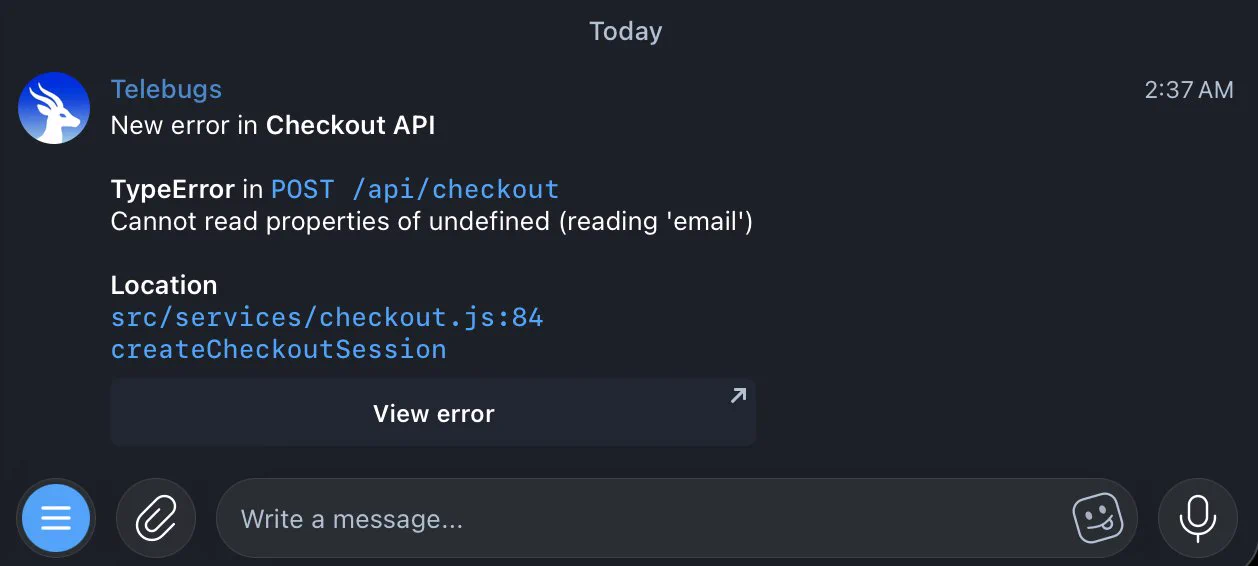
A Telegram alert with the details you need and a direct link to the error.
A clearer view of your projects
The project cards have a simpler layout: the project name at the top, a larger report count below, and the trend alongside it. Rounded corners, quieter borders, and more deliberate spacing help the page stay readable when you have a lot of projects.
Large counts keep their full value, including seven-digit totals on narrow screens. Pinned projects and grouped apps keep their existing controls. Longer-range sparklines also cover the full selected period correctly, fixing a resampling bug that could add a false flat tail.

The new cards with synthetic preview data, including seven-digit counts.
Make Telebugs feel like yours
I’ve always liked how macOS lets you choose an accent color. It’s a small setting that makes an interface feel more personal, so I brought it to Telebugs.
Appearance settings now offer eight accent colors, independent of your light or dark theme. Your choice follows your account across pages, while error states and other status colors keep their meaning.
Pick an accent color in Appearance settings and see it across the interface.
The color carries through the project sparklines, the Telebugs logo, and the highlighted source line in a backtrace.

Your accent color follows you into the code, too.
The everyday details
On phones, settings use grouped section lists with clear Back links. Save and Cancel actions follow a consistent order, sheets keep the page behind them still, and menu highlights cancel when a touch turns into scrolling.
This release also fixes the stray markup that could appear in a project’s three-dot menu and brings operational warnings into a more compact, consistent presentation.
Wrapping up
Telebugs 2.1.0 makes it easier to bring your projects over from Sentry, get errors where you already talk to your team, and make the interface feel like yours. I hope the smaller changes make the time you spend investigating errors a little more pleasant, too.